Build a terminal app: live dashboards
The to-do list only repaints when you press a key — perfect for an editor, wrong for a monitor. A dashboard has to redraw on a clock too, whether or not anyone's touching the keyboard. This last part shows the one small change that turns the same loop into a live, self-refreshing view — the shape a CLI or Docker process/resource manager takes.
1 · readKey, but with a deadline
The trick is the timeout form of readKey. readKey(ms) waits up to ms milliseconds for a keypress and returns "" if none arrived — so the loop wakes on a tick or a keystroke, whichever comes first, with no background thread and no async machinery:
import { readKey } from 'klain:tty'

let tick = 0
while (running) {
  const key: string = readKey(1500)         // wake on a key OR after ~1.5s
  if (key === 'q') {
    running = false
  } else {
    tick = tick + 1                          // '' means "just the tick"
    render(view(sample(), tick))
  }
}
leave()
An empty return just means “the timer fired” — you re-sample and repaint. A real key still comes through immediately, so q quits without waiting out the second. One loop, one thread, both a clock and a keyboard.
This is also the point to handle Ctrl-C yourself if you want a graceful exit: in raw mode it arrives as an ordinary key (character code 3), not a signal, so a key.charCodeAt(0) === 3 check can call leave() and quit cleanly.
2 · Sampling the system
Everything else is just where the numbers come from. CPU utilisation is the classic delta of busy-versus-idle jiffies between two samples of os.cpus(); memory comes from totalmem()/freemem(). Because we're a native binary these are real OS calls, not shims:
import { cpus, totalmem, freemem } from 'os'

// Aggregate { total, idle } jiffies across every core.
function sample(): { total: number; idle: number } {
  const cs = cpus()
  let total = 0, idle = 0
  for (let i = 0; i < cs.length; i++) {
    const t = cs[i].times
    total += t.user + t.nice + t.sys + t.idle + t.irq
    idle += t.idle
  }
  return { total, idle }
}

// Utilisation = 1 - (idle delta / total delta) between two samples.
const cur = sample()
const cpuFrac = 1 - (cur.idle - prev.idle) / (cur.total - prev.total)
prev = cur
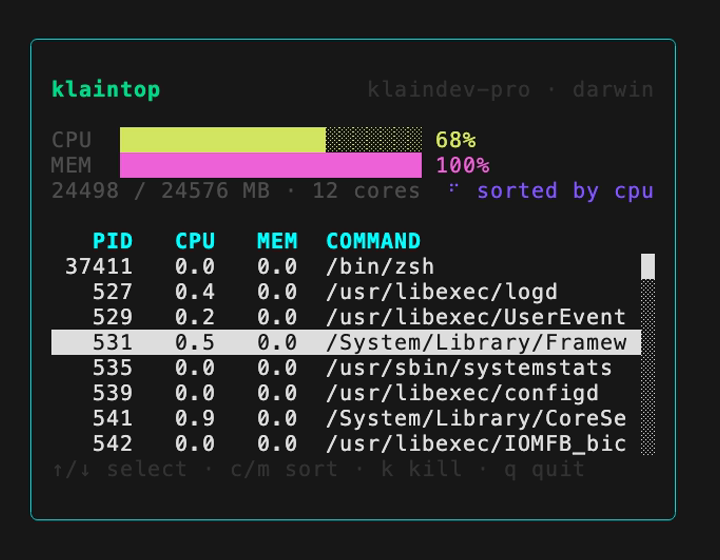
The process table is just as direct: shell out to ps with process.execFileSync, parse the lines into rows, and sort them in-process. Feed the rows to a List — which scrolls to the selection on its own — and a process.kill(pid) behind a y/n confirm turns the monitor into a manager:
// Snapshot every process via ps, parsed and sorted in-process. BSD-style
// -axo works on both macOS and Linux; we sort ourselves to avoid a
// platform-specific --sort flag.
function listProcs(sort: string): Proc[] {
  const raw: string = process.execFileSync('ps', ['-axo', 'pid,pcpu,pmem,comm'])
  const out: Proc[] = []
  for (const line of raw.split('\n').slice(1)) {
    const p = line.trim().split(/\s+/)
    if (p.length < 4) continue
    out.push({ pid: parseInt(p[0], 10), cpu: parseFloat(p[1]),
               mem: parseFloat(p[2]), comm: p.slice(3).join(' ') })
  }
  out.sort((a, b) => (sort === 'mem' ? b.mem - a.mem : b.cpu - a.cpu))
  return out
}

// ...and killing the selection is one guarded call:
if (key === 'y') { try { process.kill(procs[cursor].pid) } catch (e) {} }
Feed the CPU/memory fractions into the same Progress and Text components from Part 1, advance the spinner's frame each tick, and you have a live process manager:
Good to know
- Text is width-aware through a standard
wcwidthtable — wide CJK and emoji glyphs take two columns and combining marks fold onto their base, so alignment holds. The one gap is multi-code-point emoji joined by ZWJ (flag/family sequences), which still render as their separate glyphs. - Style enum props (colours,
border,flexDirection) are compile-time literals in this release; numeric props (sizes, padding, aProgressvalue) can be any expression. - Rendering is immediate-mode: the tree is rebuilt every frame and the cell-diff keeps the actual bytes written to the terminal minimal.
- A
Listtaller than its box scrolls to the selection and draws a scrollbar on its own; you only manage theselectedindex.
The gallery
Four complete apps, each its own apps/ directory — read the source alongside these three parts: