Build a terminal app: input & state
In Part 1 we drew a static screen from a view(state) function. Now we make it respond: read keystrokes, change the state, repaint. That's the whole update half of the state → view → update loop, and once you have it, everything from a menu to a file browser is the same pattern with a bigger state.
1 · The update loop
Keys come from klain:tty. readKey() returns one keypress — a single character, or a whole escape sequence delivered as one string (an up-arrow is the three-byte ESC [ A). It blocks until a key is pressed, which is exactly right for an input-driven app: you do nothing until the user does something. The update step is then just a switch over the key, followed by a repaint:
process.stdin.setRawMode(true)
let running = true
while (running) {
  const key: string = readKey()             // blocks until a keypress

  if (key === 'q') {
    running = false
  } else if (key === '\x1b[A') {            // up arrow
    cursor = (cursor + tasks.length - 1) % tasks.length
  } else if (key === '\x1b[B') {            // down arrow
    cursor = (cursor + 1) % tasks.length
  } else if (key === ' ') {
    tasks[cursor].done = !tasks[cursor].done
  } else if (key === 'a') {
    adding = true                            // start collecting a new task
  }
  render(view(tasks, cursor, adding, draft)) // repaint after every key
}
leave()
That's the entire interaction model. Arrow keys move a cursor (note the modulo wrap so it loops around the ends), space toggles the selected task, and q quits by ending the loop. After every branch we call render(view(...)) — because the view is a pure function of state, you never touch a widget directly; you change a variable and redraw.
Reading the first byte with key.charCodeAt(0)? Guard it — readKey() can hand back an empty string on end-of-input, and ''.charCodeAt(0) is NaN. The to-do list uses key.length > 0 ? key.charCodeAt(0) : -1 so a stray EOF can't misfire a shortcut.
2 · Editing text
A text field is just more state. Pressing a flips an adding flag; while it's set, printable keys append to a draft string and Backspace trims it, which we show live with TextInput(draft). Enter commits the draft as a new task and clears it. There's no hidden input widget with its own buffer — you own the keystrokes, so the behaviour is exactly what you write:
if (adding) {
  if (key === '\r' || key === '\n') {        // Enter: commit the draft
    if (draft.length > 0) tasks.push({ text: draft, done: false })
    draft = ''
    adding = false
  } else if (key === '\x7f') {                // Backspace
    draft = draft.slice(0, draft.length - 1)
  } else if (key.length === 1 && key >= ' ') { // a printable character
    draft = draft + key
  }
}
// ...and in view(), while `adding`, show the field:
//   TextInput(draft, { color: 'cyan' })
3 · Persistence with fs
Because this compiles to a real native binary, the whole standard library is available right inside the loop — no bridge, no IPC. Here that's fs: we load tasks on startup and save on quit, one line per task.
import { existsSync, readFileSync, writeFileSync } from 'fs'

function save(tasks: Task[]): void {
  let body = ''
  for (let i = 0; i < tasks.length; i++) {
    body = body + (tasks[i].done ? '1 ' : '0 ') + tasks[i].text + '\n'
  }
  writeFileSync('.klain-todo.txt', body)     // real native file I/O
}

function load(): Task[] {
  if (!existsSync('.klain-todo.txt')) return []
  // ...split readFileSync('.klain-todo.txt') back into { text, done }.
  return parse(readFileSync('.klain-todo.txt'))
}
And that's a complete, persistent application, split by concern (types / store / view / main). The full runnable source:
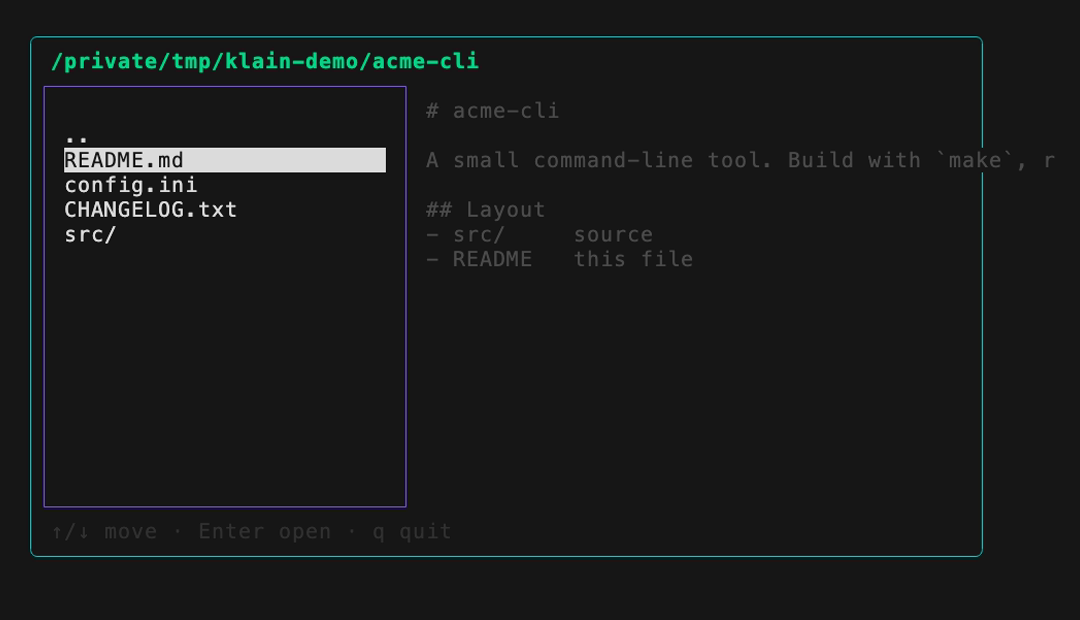
Going further: the same loop, more state
Nothing about this pattern is specific to a to-do list. A two-pane file browser is the same state → view → update loop where the state is “which directory am I in and what's selected”; each keypress rebuilds the listing and re-reads the highlighted entry for a live preview, using real fs/path calls. Same three moving parts, richer view: